
WordPress插件Global Payments HPP是一款信用卡支付网关WooCommerce插件,让你可以使用Global Payments支付网关安全地接受信用卡付款并支持退款。
Global Payments 电子商务每年处理超过 110 亿笔交易,250 万家企业使用其安全、无缝和可靠的解决方案进行在线、电话和面对面的卡片处理。
需要一个 Global Payments 帐户。在此处注册 Global Payments 帐户。
作为全球最大的支付处理公司之一,Global Payments 处理所有主流信用卡,并提供无与伦比的解决方案和服务范围,以帮助您发展业务并增加收入。
这个 Global Payments HPP 扩展(以前称为“Realex HPP”)将使您的 WooCommerce 商店能够通过 Global Payments 托管支付页面 (HPP) 进行付款。HPP 是符合 PCI DSS v3.2 的重定向解决方案。它使您可以轻松处理付款,同时减少与收集卡数据相关的重大 PCI 合规负担。使用 HPP 的商家可以通过填写简短的 PCI DSS 自我评估问卷 (SAQ) A 来证明其 PCI 合规性。
为什么选择Global Payments HPP?
→ 最大化转化
随处销售:使用适用于任何设备的支付页面,让您的客户在台式机、移动设备或平板电脑上轻松完成购买流程。
自定义支付体验:品牌支付页面与 WooCommerce 简单集成,并适应 30 多种语言和多种支付方式和货币。
→ 尽量减少欺诈
监控、管理和最小化:欺诈和拒付,即时访问 30 多项欺诈检查以保留或阻止可疑交易。
轻松配置新的欺诈规则:使用简单的语言和直观的界面,同时以被动模式试验新规则以在上线前分析影响。
→ 保留控制权
实时透明报告:帮助您核对交易,并能够轻松搜索、作废和回扣您的交易。
简化:PCI 合规性并降低审计成本,同时为您的客户保留对端到端支付体验的完全控制。
Global Payments HPP功能
- 接受所有主要卡类型:Visa®、MasterCard®、American Express®、Discover® 和 Diners Club
- 以 150 种货币进行交易处理,包括允许购物者以他们的货币支付的动态货币转换
- 完全符合 PCI 1 级标准、响应迅速且可定制的支付页面,支持 30 多种语言
- 欺诈检查,包括 CVN、3D Secure(包括 Amex SafeKey)和 AVS
- 广泛的欺诈管理工具套件
- 在 WooCommerce 内自动处理退款
- 直接从 WooCommerce 编辑订单屏幕捕获先前授权的交易,包括部分捕获 新
- 对仅包含虚拟物品的订单强制收费,而不是授权它们新
- 选择使用 iframe 支付页面让客户留在现场,或使用重定向将客户引导至安全支付页面
- 客户可以安全地将他们的付款方式保存到他们的帐户中,以便更轻松地结帐新
- 托管卡管理,用于提供无缝支付体验的一键式解决方案
- 在结帐时显示详细的拒绝消息而不是通用订单新
- 全面支持WooCommerce Subscriptions新
- 全面支持WooCommerce Pre-Orders新
Global Payments HPP Features
- Accept all major card types: Visa®, MasterCard®, American Express®, Discover®, and Diners Club
- Transaction processing in 150 currencies, including Dynamic Currency Conversion to allow shoppers to pay in their currency
- Fully PCI level 1-compliant, responsive and customizable payment page with support for 30+ languages
- Fraud checks including CVN, 3D Secure (incl. Amex SafeKey), and AVS
- Extensive suite of fraud management tools
- Process refunds / voids automatically from within WooCommerce NEW
- Capture prior authorized transactions right from the WooCommerce edit order screen, including partial captures NEW
- Force charges for orders with only virtual items instead of authorizing them NEW
- Choose to keep customers on-site with an iframe pay page, or use a redirect to send customers to the secure pay page
- Customers can securely save their payment method to their account for easier checkout NEW
- Hosted Card Management for a 1-Click solution delivering a seamless payment experience
- Show detailed decline messages at checkout instead of generic orders NEW
- Full Support for WooCommerce Subscriptions NEW
- Full Support for WooCommerce Pre-Orders NEW
无缝和安全的支付处理
此扩展程序会在您的结帐中显示一个付款表格,该表格向客户显示接受的付款方式以及下订单的选项。
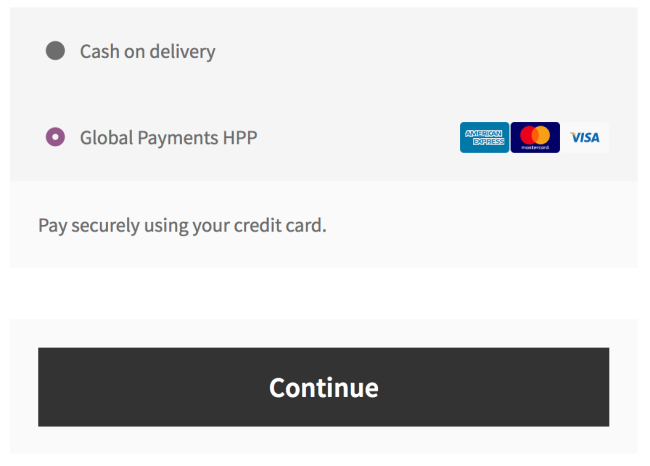
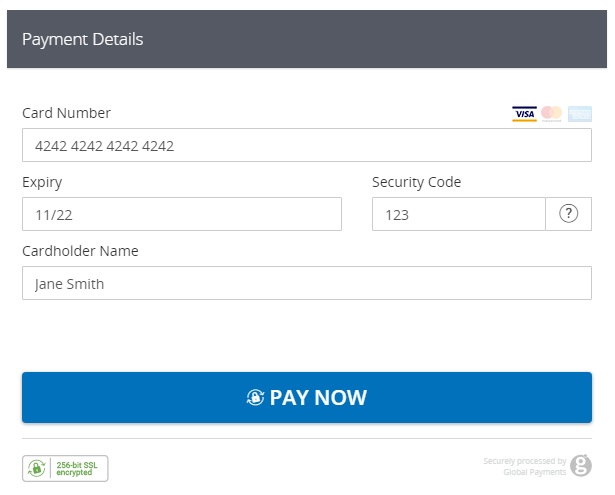
点击“继续”后,客户将被自动重定向到环汇的安全服务器进行支付。HPP 可以加载到商店的 iFrame 中,您可以自定义外观。所以客户不需要觉得他们被重定向了,他们可以专注于完成他们的订单!
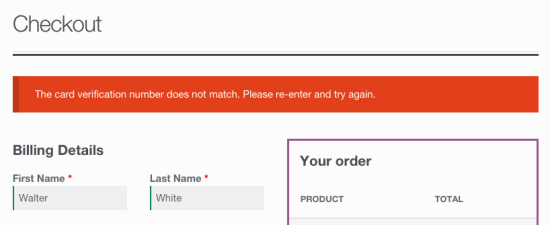
您还可以选择向客户显示详细的拒绝消息,不再显示“发生错误”错误消息。
保存的付款方式 – 新
Global Payments 的卡存储令牌化解决方案旨在增强您的客户体验,同时减轻您的 PCI 合规性要求。所有敏感的持卡人数据都由 Global Payments 保存,而 WooCommerce 仅存储令牌引用。然后,您可以调用 HPP 以允许您的客户使用他们保存的一张卡付款,他们还可以更新和删除它们。
Card Storage为回头客提供无摩擦的结账流程,从而为您带来更高的转化率和更多的销售额。
Saved Payment Methods – NEW
Global Payments’s Card Storage tokenization solution is designed to enhance your customer’s experience while alleviating your PCI Compliance requirements. All sensitive cardholder data is held by Global Payments while WooCommerce simply stores the token references. You can then call on the HPP to allow your customer to pay with one of their saved cards, and they can also update and delete them.
Card Storage provides a frictionless checkout process for returning customers, resulting in higher conversions and more sales for you.
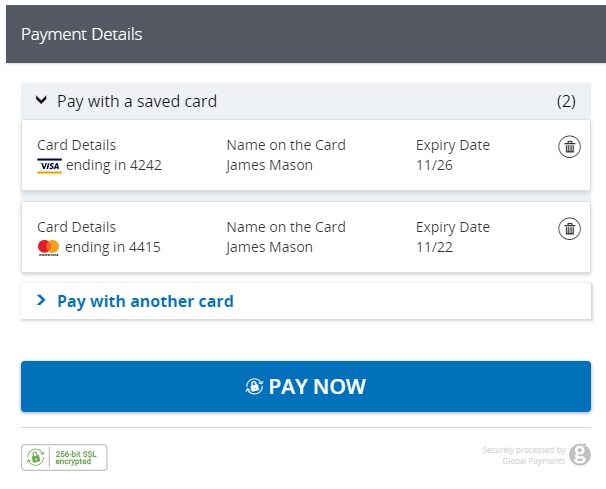
卡存储还与WooCommerce Subscriptions完全兼容- 支持所有订阅功能,如付款日期更改、订阅日期更改等 – 以及WooCommerce Pre-Orders。
支持自动退款和作废 – 新
商店员工现在可以直接在 WooCommerce 内处理使用 Global Payments 支付的订单的退款 – 无需再登录您的商家帐户来处理退款!通过从“编辑订单”屏幕创建全部或部分退款并通过单击“通过信用卡退款”将交易自动发送到 Global Payments 来加快您的商店管理。
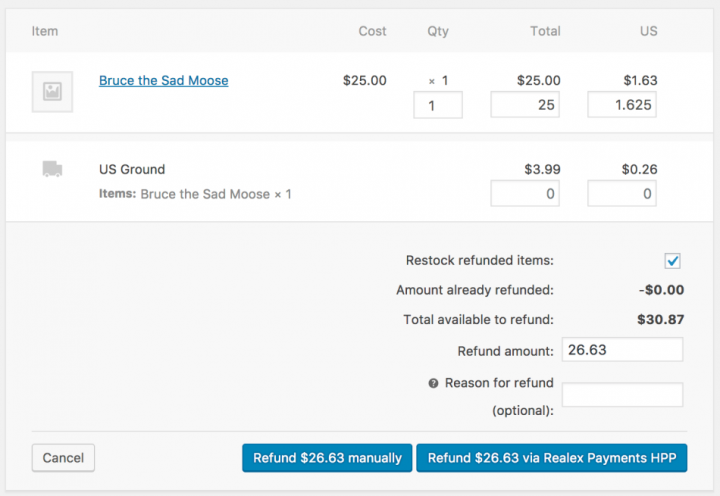
如果交易尚未被捕获或结算,将自动执行交易无效以取消订单。
直接从 WooCommerce 收取费用 – 新
一些用户选择将支付网关设置为仅授权费用而不是授权和捕获费用。但是,这需要用户登录支付网关管理员以获取费用。
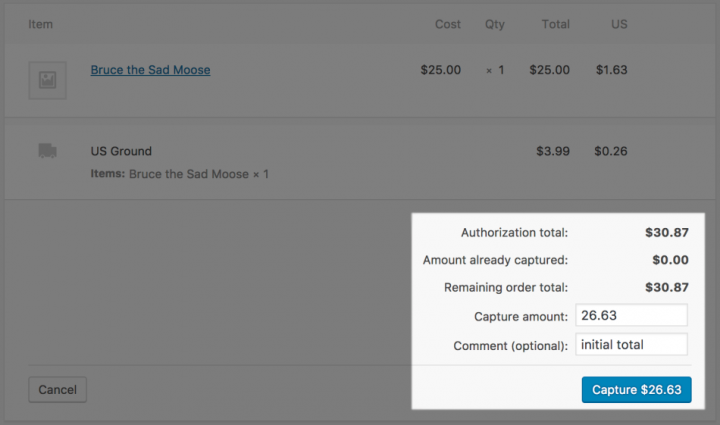
此扩展的 2.0+ 版允许您有选择地直接从 WooCommerce编辑订单屏幕捕获先前授权的交易,而不是登录您的 Global Payments 控制面板来执行此操作。只需编辑订单,选择“收取费用”操作,费用将通过 Global Payments 收取。
Capture Charges directly from WooCommerce – NEW
Some users choose to set the payment gateway to only authorize charges rather than authorize & capture them. However, this requires the user to then log into the payment gateway admin to capture charges.
Version 2.0+ of this extension allow you to optionally capture previously authorized transactions directly from the WooCommerce Edit Order screen rather than logging into your Global Payments control panel to do so. Simply edit the order, select the “Capture Charge” action, and charges will be captured through Global Payments.
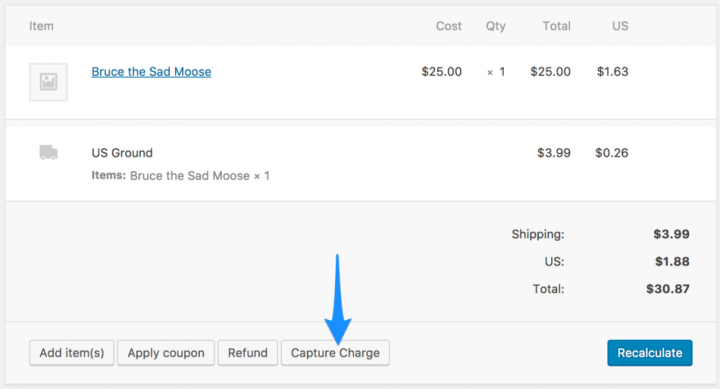
如果您启用了部分捕获,您甚至可以输入要捕获的数量,并通过 WooCommerce 处理多个捕获。
来自Global Payments的其他网关
对于结帐页面上带有付款字段的集成结帐流程,请考虑Global Payments API 付款网关。此扩展程序使客户在整个结帐过程中都留在您的网站上,而不是使用托管的付款页面或 iFrame。