
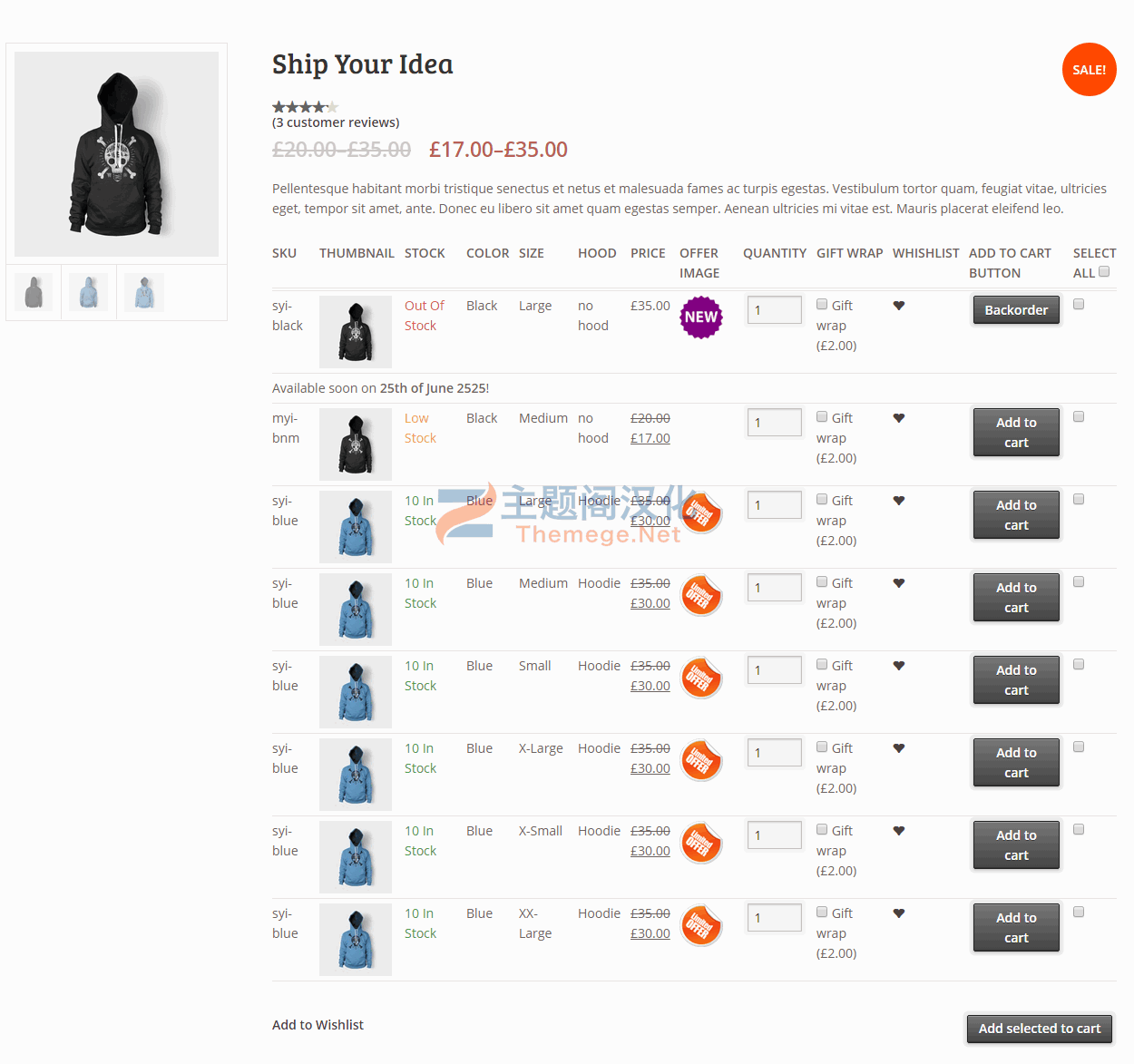
WordPress插件V2TG(Variations to Table – Grid)是一款以表格和网格显示商品变体的WooCommerce插件,会将产品页面的默认变体选择选项菜单转换为用户友好的表格 – 网格显示。它具有不言自明的大量选项管理设置面板、出色的文档和支持以及每个产品选项。
特征
- 用户友好且一目了然的管理面板。
- 显示您的可变产品所需的所有数据,并提供禁用它们的选项。
- 设置产品变体时支持“任何”
- 支持您可以动态添加到产品的“自定义属性”
- “将所选内容加入购物车”,选中所有复选框以将变体批量加入购物车
- 禁用或启用每个产品的表格/网格的选项。
- 库存、缺货和低库存(带阈值)自定义消息
- 易于使用的简码和完整的文档,可帮助您将表格放在需要的地方并执行简码。
- 易于使用的全局短代码,可在任何页面上显示所有可变产品的所有变体。
- 可扩展/开发人员友好。您可以在不破解的情况下更改插件,但可以通过 WordPress 过滤器和操作进行更改。
- 使用您的自定义贴纸/图标使变体脱颖而出。您可以根据变体启用/禁用或覆盖它。
- Supports WooCommerce Variation Swatches and Photos
- Supports YITH WooCommerce Wishlist
- Supports YITH WooCommerce Quick View
- Supports WooCommerce Product Gift Wrap
- 可以从设置中启用 AJAX
- 前端表列的排序
- 可以设置默认表头(自动生成)、通用自定义表头和每个产品自定义表头
- 可通过 .po / .mo 文件轻松翻译。
用法
为了使用 Woocommerce Variations to Table – Grid 插件,请从您的 WordPress 管理面板导航到“ Woocommerce -> Variations Table “
选项
- 排除类别:您可以选择整个类别来排除插件,以便使用默认选择菜单显示变体
- 显示缩略图:选择“是”显示缩略图列或选择“否”隐藏它。
- 以像素为单位的缩略图宽度:您可以在此字段中以像素为单位定义缩略图的宽度
- 显示库存:选择“是”显示库存情况栏或选择“否”隐藏它。
- In Stock Text : 如果显示库存,您可以设置变体在库存时显示的文本
- Out of Stock Text : 如果显示有存货,您可以设置变体缺货时显示的文本
- Low Stock Text : 如果显示库存,您可以设置变体库存低时显示的文本
- Low Stock Threshold : 输入将触发低库存状态的变化数量
- 显示价格:选择“是”显示价格栏或选择“否”隐藏它。
- 显示总计(新建):选择“是”显示总计栏或选择“否”隐藏它。
- 显示数量字段:选择“是”显示要添加到购物车的产品的数量输入字段或“否”隐藏它。
- 显示添加到购物车:选择“是”显示添加到购物车按钮列或选择“否”隐藏它。
- 显示心愿单:选择“是”显示心愿单图标栏或选择“否”隐藏它。
- 显示图像:选择“是”显示额外的图像/贴纸/图标列或选择“否”隐藏它。
- 添加图像:通过单击打开媒体管理器按钮上传额外的图像/贴纸/图标。
- 显示说明:选择“是”可在变体行下方显示说明。
- 显示表格标题:选择“是”显示表格标题。
- 自定义表格标题:您可以在此处为所有表格标题编写自己的自定义 HTML 代码。
- 启用 Ajax : 选择“是”为“添加到购物车”和“愿望清单”启用 AJAX
- 启用响应式表格:选择“是”以使表格移动友好
- 定单栏:您可以责令被列拖正掉落列表元素
- 你准备好了!* 保存更改 *
Options
- Exclude Categories: You may select whole categories to exclude the plugin in order to display the variations with the default select menus
- Display Thumbnail: Select “yes” to display the thumbnail column or “no” to hide it.
- Thumbnail Width in Pixels: You may define the with of the thumbnail in pixels in this field
- Display Stock: Select “yes” to display the stock condition column or “no” to hide it.
- In Stock Text: If the stock is displayed, you may set the text to display when the variation is in stock
- Out of Stock Text: If the stock is displayed, you may set the text to display when the variation is out of stock
- Low Stock Text: If the stock is displayed, you may set the text to display when the variation stock is low
- Low Stock Threshold: Enter the quantity of the variation that will trigger the low stock status
- Display Price: Select “yes” to display the price column or “no” to hide it.
- Display Total (New): Select “yes” to display the totals column or “no” to hide it.
- Display Quantity Field: Select “yes” to display the quantity input field of the products to be added to cart column or “no” to hide it.
- Display Add To Cart: Select “yes” to display the add to cart button column or “no” to hide it.
- Display Wishlist: Select “yes” to display the wishlist icon column or “no” to hide it.
- Display Image: Select “yes” to display an extra image/sticker/icon column or “no” to hide it.
- Add Image: Upload the extra image/sticker/icon by clicking on the Open Media Manager button.
- Display Description: Select “yes” to display a description under the row of the variation.
- Display Table Header: Select “yes” to display table header.
- Custom Table Header: You may write your own custom HTML code for all table headers here.
- Enable Ajax: Select “yes” to enable AJAX for “add to cart” and “wishlist”
- Enable Responsive Table: Select “yes” to make the table mobile friendly
- Order Columns: You may order the columns by drag-n-dropping the list elements
- You are ready to go! * Save Changes *
阅读全文
常见问题
下载地址失效了怎么版?
客服会第一时间检查下载地址,并发送到您的注册邮箱。如未及时处理可联系客服QQ或邮箱。
导入演示被中断了想重新导入怎么办?
https://themege.net/23822.html
不懂导入演示数据?无法一键导入演示数据?
https://themege.net/16186.html
原文链接:https://themege.net/19677.html,转载请注明出处。